Optional JDK 8
Optional JDK 1.8
Java 8 has introduced a new class Optional in java.util package. It can help in writing a neat code without using too many null checks. By using Optional, we can specify alternate values to return or alternate code to run. This makes the code more readable because the facts which were hidden are now visible to the developer.
Advantages of Java 8 Optional:
The above program using Optional Class
// Java program with Optional Class
import java.util.Optional;
public class OptionalDemo{
public static void main(String[] args) {
String[] words = new String[10];
Optional<String> checkNull =
Optional.ofNullable(words[5]);
if (checkNull.isPresent()) {
String word = words[5].toLowerCase();
System.out.print(word);
} else
System.out.println("word is null");
}
}
Output
Following table shows the list of Instance Methods provided by Optional Class :


Concrete Methods : A concrete method means, the method have complete definition but it can be overridden in the inherited class. If we make this method final, then it can not be overridden. Declaring method or class “final” means it’s implementation is complete. It is compulsory to override the abstract methods. Concrete Methods can be overridden in the inherited classes if they are not final.Following table shows the list of Concrete Methods provided by Optional Class :

Below are the Example
------------------------------------------------------------------------------------------------------------------------------
// Java program to illustrate
// optional class methods
import java.util.Optional;
class GFG {
// Driver code
public static void main(String[] args)
{
// creating a string array
String[] str = new String[5];
// Setting value for 2nd index
str[2] = "Geeks Classes are coming soon";
// It returns an empty instance of Optional class
Optional<String> empty = Optional.empty();
System.out.println(empty);
// It returns a non-empty Optional
Optional<String> value = Optional.of(str[2]);
System.out.println(value);
}
}
-------------------------------------------------------------------------------------------------------------------------------
// Java program to illustrate
// optional class methods
import java.util.Optional;
class GFG {
// Driver code
public static void main(String[] args)
{
// creating a string array
String[] str = new String[5];
// Setting value for 2nd index
str[2] = "Geeks Classes are coming soon";
// It returns a non-empty Optional
Optional<String> value = Optional.of(str[2]);
// It returns value of an Optional.
// If value is not present, it throws
// an NoSuchElementException
System.out.println(value.get());
// It returns hashCode of the value
System.out.println(value.hashCode());
// It returns true if value is present,
// otherwise false
System.out.println(value.isPresent());
}
}
---------------------------------------------------------------------------------------------
Java 8 has introduced a new class Optional in java.util package. It can help in writing a neat code without using too many null checks. By using Optional, we can specify alternate values to return or alternate code to run. This makes the code more readable because the facts which were hidden are now visible to the developer.
Advantages of Java 8 Optional:
- Null checks are not required.
- No more NullPointerException at run-time.
- We can develop clean and neat APIs.
- No more Boiler plate code
The above program using Optional Class
// Java program with Optional Class
import java.util.Optional;
public class OptionalDemo{
public static void main(String[] args) {
String[] words = new String[10];
Optional<String> checkNull =
Optional.ofNullable(words[5]);
if (checkNull.isPresent()) {
String word = words[5].toLowerCase();
System.out.print(word);
} else
System.out.println("word is null");
}
}
Output
word is null
Optional is a container object which may or may not contain a non-null value. You must import java.util package to use this class. If a value is present, isPresent() will return true and get() will return the value. Additional methods that depend on the presence or absence of a contained value are provided, such as orElse() which returns a default value if value not present and ifPresent() which executes a block of code if the value is present. This is a value-based class, i.e their instances are :
- Final and immutable (though may contain references to mutable objects).
- Considered equal solely based on equals(), not based on reference equality(==).
- Do not have accessible constructors.
Following table shows the list of Static Methods provided by Optional Class :
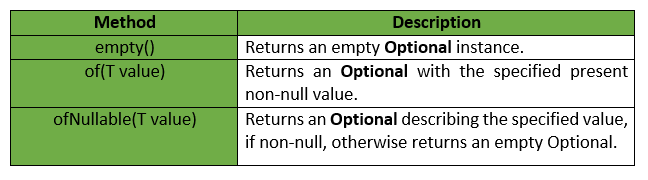
Following table shows the list of Instance Methods provided by Optional Class :
Concrete Methods : A concrete method means, the method have complete definition but it can be overridden in the inherited class. If we make this method final, then it can not be overridden. Declaring method or class “final” means it’s implementation is complete. It is compulsory to override the abstract methods. Concrete Methods can be overridden in the inherited classes if they are not final.Following table shows the list of Concrete Methods provided by Optional Class :
Below are the Example
------------------------------------------------------------------------------------------------------------------------------
// Java program to illustrate
// optional class methods
import java.util.Optional;
class GFG {
// Driver code
public static void main(String[] args)
{
// creating a string array
String[] str = new String[5];
// Setting value for 2nd index
str[2] = "Geeks Classes are coming soon";
// It returns an empty instance of Optional class
Optional<String> empty = Optional.empty();
System.out.println(empty);
// It returns a non-empty Optional
Optional<String> value = Optional.of(str[2]);
System.out.println(value);
}
}
-------------------------------------------------------------------------------------------------------------------------------
// Java program to illustrate
// optional class methods
import java.util.Optional;
class GFG {
// Driver code
public static void main(String[] args)
{
// creating a string array
String[] str = new String[5];
// Setting value for 2nd index
str[2] = "Geeks Classes are coming soon";
// It returns a non-empty Optional
Optional<String> value = Optional.of(str[2]);
// It returns value of an Optional.
// If value is not present, it throws
// an NoSuchElementException
System.out.println(value.get());
// It returns hashCode of the value
System.out.println(value.hashCode());
// It returns true if value is present,
// otherwise false
System.out.println(value.isPresent());
}
}
---------------------------------------------------------------------------------------------
import java.util.Optional;

public class OptionalBasicExample {

    public static void main(String[] args) {

        Optional<String> gender = Optional.of("MALE");
        String answer1 = "Yes";
        String answer2 = null;

        System.out.println("Non-Empty Optional:" + gender);
        System.out.println("Non-Empty Optional: Gender value : " + gender.get());
        System.out.println("Empty Optional: " + Optional.empty());

        System.out.println("ofNullable on Non-Empty Optional: " + Optional.ofNullable(answer1));
        System.out.println("ofNullable on Empty Optional: " + Optional.ofNullable(answer2));

        // java.lang.NullPointerException
        System.out.println("ofNullable on Non-Empty Optional: " + Optional.of(answer2));

    }

}
Output Non-Empty Optional:Optional[MALE]
Non-Empty Optional: Gender value : MALE
Empty Optional: Optional.empty
ofNullable on Non-Empty Optional: Optional[Yes]
ofNullable on Empty Optional: Optional.empty
Exception in thread "main" java.lang.NullPointerException
at java.util.Objects.requireNonNull(Objects.java:203)
at java.util.Optional.<init>(Optional.java:96)
at java.util.Optional.of(Optional.java:108)
//...
----------------------------------------------------------------------------------Optional.map and flatMap
import java.util.Optional;

public class OptionalMapFlapMapExample {

    public static void main(String[] args) {

        Optional<String> nonEmptyGender = Optional.of("male");
        Optional<String> emptyGender = Optional.empty();

        System.out.println("Non-Empty Optional:: " + nonEmptyGender.map(String::toUpperCase));
        System.out.println("Empty Optional    :: " + emptyGender.map(String::toUpperCase));

        Optional<Optional<String>> nonEmptyOtionalGender = Optional.of(Optional.of("male"));
        System.out.println("Optional value   :: " + nonEmptyOtionalGender);
        System.out.println("Optional.map     :: " + nonEmptyOtionalGender.map(gender -> gender.map(String::toUpperCase)));
        System.out.println("Optional.flatMap :: " + nonEmptyOtionalGender.flatMap(gender -> gender.map(String::toUpperCase)));

    }

}
Output
Non-Empty Optional:: Optional[MALE]
Empty Optional :: Optional.empty
Optional value :: Optional[Optional[male]]
Optional.map :: Optional[Optional[MALE]]
Optional.flatMap :: Optional[MALE]
-----------------------------------------------------------------------------------------------------------------------------
Optional Filter
import java.util.Optional;

public class OptionalFilterExample {

    public static void main(String[] args) {

        Optional<String> gender = Optional.of("MALE");
        Optional<String> emptyGender = Optional.empty();

        //Filter on Optional
        System.out.println(gender.filter(g -> g.equals("male"))); //Optional.empty
        System.out.println(gender.filter(g -> g.equalsIgnoreCase("MALE"))); //Optional[MALE]
        System.out.println(emptyGender.filter(g -> g.equalsIgnoreCase("MALE"))); //Optional.empty

    }

}
output Optional.empty
Optional[MALE]
Optional.empty --------------------------------------------------------------------------Optional isPresent and ifPresent
Optional.isPresent() returns true if the given Optional object is non-empty. Otherwise it returns false.Optional.ifPresent() performs given action if the given Optional object is non-empty. Otherwise it returns false.import java.util.Optional;
public class OptionalIfPresentExample {
public static void main(String[] args) {
Optional<String> gender = Optional.of("MALE");
Optional<String> emptyGender = Optional.empty();
if (gender.isPresent()) {
System.out.println("Value available.");
} else {
System.out.println("Value not available.");
}
gender.ifPresent(g -> System.out.println("In gender Option, value available."));
//condition failed, no output print
emptyGender.ifPresent(g -> System.out.println("In emptyGender Option, value available."));
}
} output Value available.
In gender Option, value available.----------------------------------------------------------------------------- Optional orElse methods
It returns the value if present in Optional Container. Otherwise returns given default value.
import java.util.Optional;

public class OptionalOrElseExample {

    public static void main(String[] args) {

        Optional<String> gender = Optional.of("MALE");
        Optional<String> emptyGender = Optional.empty();

        System.out.println(gender.orElse("<N/A>")); //MALE
        System.out.println(emptyGender.orElse("<N/A>")); //<N/A>

        System.out.println(gender.orElseGet(() -> "<N/A>")); //MALE
        System.out.println(emptyGender.orElseGet(() -> "<N/A>")); //<N/A>

    }

}
Output MALE
<N/A>
MALE
<N/A>-----------------------------------------------------------------------------------
Comments
Post a Comment